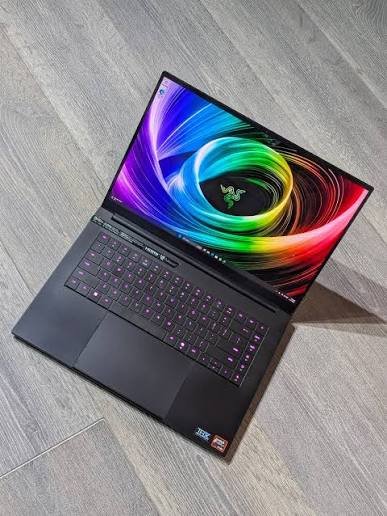
Gaming laptops have evolved dramatically over the past few years, and few models have earned as much attention as the Razer Blade 14. Known for its premium aluminum chassis, compact size, and powerful internal hardware, it has become a favorite among gamers who want desktop-class performance without carrying a bulky machine.
One of the most common questions buyers ask before investing in this premium laptop is whether it can truly handle modern AAA games at maximum settings. After all, today’s biggest releases feature advanced graphics, ray tracing, realistic physics, massive open worlds, and increasingly demanding system requirements.
The short answer is yes—the Razer Blade 14 is capable of delivering an excellent AAA gaming experience. However, understanding what “maximum settings” actually means requires a closer look at the laptop’s hardware, display, cooling, and real-world gaming performance.
Why AAA Games Demand So Much Power
Modern AAA games are significantly more demanding than they were just a few years ago.
Today’s titles feature ultra-high-resolution textures, realistic lighting systems, complex particle effects, dynamic weather, advanced artificial intelligence, detailed environments, and real-time ray tracing. Games are no longer limited by graphics alone—they also place heavy demands on processors, memory, and storage.
Running these games at their highest graphical settings requires a balanced combination of:
- A powerful multi-core processor
- A dedicated NVIDIA GeForce RTX graphics card
- Fast DDR memory
- High-speed NVMe SSD storage
- Efficient thermal management
The Razer Blade 14 is built with these requirements in mind.
Hardware Designed for High-End Gaming
The Blade 14 is equipped with AMD Ryzen processors paired with NVIDIA GeForce RTX graphics, creating a combination capable of handling demanding modern games.
The processor ensures smooth gameplay by managing physics calculations, AI behavior, and background tasks, while the RTX GPU handles advanced rendering techniques including ray tracing and AI-powered upscaling.
Fast SSD storage significantly reduces loading times, allowing massive open-world environments to load quickly while improving overall system responsiveness.
Together, these components create a gaming platform that remains competitive with many larger gaming laptops.
Performance in Modern AAA Games
The Blade 14 performs exceptionally well across a wide variety of modern games.
Open-world adventures featuring expansive maps run smoothly while maintaining impressive visual quality.
Story-driven action games with cinematic graphics perform confidently at high settings.
Competitive shooters easily achieve high frame rates that fully utilize the laptop’s fast display.
Racing simulators benefit from smooth animations and detailed environments.
Role-playing games featuring complex worlds and detailed character models also perform impressively.
While exact frame rates vary depending on the specific hardware configuration and game optimization, the Blade 14 consistently delivers a premium gaming experience across nearly every genre.
Can You Actually Play at Maximum Settings?
This is where expectations should be realistic.
The answer depends on three important factors:
Resolution
Running games at Full HD is considerably less demanding than playing at Quad HD or higher resolutions.
The Blade 14 comfortably handles maximum graphical settings at lower resolutions while maintaining excellent performance.
At higher resolutions, demanding games may require small graphical adjustments to maintain consistently high frame rates.
Ray Tracing
Ray tracing dramatically improves lighting, reflections, and shadows.
However, it also places enormous pressure on the graphics card.
Fortunately, modern RTX GPUs support technologies such as DLSS, allowing many games to maintain smooth performance even with ray tracing enabled.
For many titles, this means you can enjoy impressive visuals without sacrificing too much performance.
Individual Game Optimization
Not every game is equally optimized.
Some AAA titles run efficiently even at maximum settings, while others remain demanding regardless of the hardware available.
Well-optimized games generally perform extremely well on the Blade 14, whereas poorly optimized releases may require reducing a few graphics options for smoother gameplay.
The Display Complements the Hardware
Powerful hardware deserves an equally capable display.
The Blade 14 typically includes a high-refresh-rate display that enhances both competitive and single-player gaming.
Fast refresh rates create smoother animations during fast-moving scenes.
Higher resolutions improve image sharpness and environmental detail.
Excellent color reproduction enhances immersive gaming experiences.
Wide viewing angles make every scene look consistent from different positions.
The display helps players fully appreciate the graphical capabilities of modern AAA titles.
Cooling Performance During Long Gaming Sessions
Compact gaming laptops face a unique challenge.
Powerful components generate significant heat, yet the smaller chassis provides less physical space for cooling compared to larger gaming laptops.
Razer addresses this challenge with an advanced cooling system designed to keep temperatures under control during demanding workloads.
During extended gaming sessions, fans become more active to maintain stable operating temperatures.
While fan noise increases under heavy loads, the cooling system generally succeeds in preventing severe thermal throttling.
This allows the Blade 14 to sustain strong gaming performance even during long play sessions.
Competitive Gaming Performance
Although AAA games often receive the most attention, competitive esports titles are another area where the Blade 14 excels.
Fast-paced multiplayer games typically achieve extremely high frame rates thanks to their lower graphical demands compared to cinematic AAA titles.
The high-refresh-rate display further enhances responsiveness, making aiming, movement, and reaction times feel smoother.
For players who divide their time between esports and story-driven games, the Blade 14 offers an excellent balance.
Beyond Gaming
One reason many buyers choose the Blade 14 is its versatility.
The same hardware that powers modern games also accelerates demanding professional applications.
Video editing becomes faster.
3D rendering completes more efficiently.
Photo editing feels smoother.
Programming large software projects becomes easier.
Machine learning and AI workloads benefit from dedicated GPU acceleration.
This means the laptop remains productive during working hours before transforming into a powerful gaming machine in the evening.
Is the Compact Size a Limitation?
Some buyers assume smaller gaming laptops cannot match the performance of larger machines.
In practice, the Blade 14 performs remarkably well considering its size.
While certain larger 16-inch or 18-inch gaming laptops may sustain slightly higher performance due to more aggressive cooling systems, the difference is often smaller than expected during everyday gaming.
For users who prioritize portability, the Blade 14 offers one of the best compromises between size and power.
You gain exceptional mobility without giving up premium gaming performance.
Tips for Getting the Best Gaming Performance
To maximize your gaming experience, it’s worth following a few simple practices.
Keep graphics drivers updated to benefit from game-specific optimizations and performance improvements.
Use the laptop while connected to AC power, as gaming performance is highest when plugged in.
Adjust the performance profile through the system software to prioritize maximum performance during gaming sessions.
Ensure proper airflow by using the laptop on a hard, flat surface rather than soft materials that can block ventilation.
These small adjustments help the Blade 14 perform at its full potential.
Who Will Be Most Satisfied?
The Blade 14 is ideal for gamers who want excellent AAA performance without carrying a large desktop replacement.
It is particularly well suited to:
- Gamers who travel frequently
- College students
- Content creators who also play games
- Professionals wanting one laptop for work and gaming
- Users who appreciate premium build quality and minimalist design
For these buyers, the Blade 14 delivers a combination that very few gaming laptops can match.
Final Verdict
So, can the Razer Blade 14 handle modern AAA games at maximum settings?
For the vast majority of today’s games, the answer is yes. Its combination of powerful AMD Ryzen processors, NVIDIA GeForce RTX graphics, fast SSD storage, and high-refresh-rate display allows it to run modern titles with outstanding visual quality and smooth performance. In many games, maximum settings are entirely achievable, while the most demanding releases may only require small adjustments—particularly when using higher resolutions or enabling advanced ray tracing effects.
What truly sets the Blade 14 apart is that it delivers this level of gaming performance in a compact, premium-built laptop that is equally capable of handling creative workloads and professional tasks. If you’re looking for a portable gaming machine that can confidently tackle today’s AAA games while remaining practical for everyday use, the Razer Blade 14 remains one of the strongest premium 14-inch gaming laptops available.